


Wallet: Budget Expense Tracker
4.67.52K Reviews
App Specs
- Version
- 9.3.6
- Updated On
- License
- Free
- Downloads
- 10,000,000+
- Developer
- BudgetBakers
- Categories
- Finance
- Platform
- Android, iOS
Screenshots
 Analysis by AppCompare
What makes a budget useful to me isn’t a colorful chart; it’s the moment I can see a spending pattern while there’s still time to change it. Wallet: Budget Expense Tracker is built around that kind of everyday awareness, bringing expenses, budgets, and financial goals into one place. I find the idea most appealing for people who want a clearer picture of their habits without maintaining a spreadsheet by hand.
The value of seeing spending by category
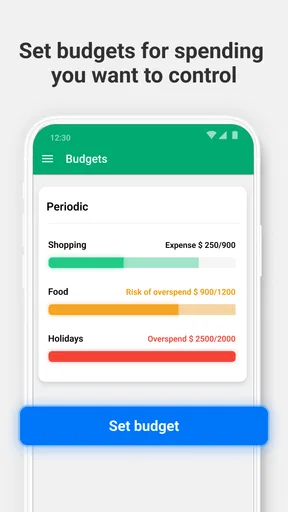
Budgeting by category is the feature I’d put at the center of the experience. Instead of treating a month’s expenses as one confusing total, you can separate areas such as groceries, eating out, or coffee and set a limit for each. That makes the budget more actionable: if one category starts creeping up, you can respond there rather than feeling that your entire financial plan has failed.
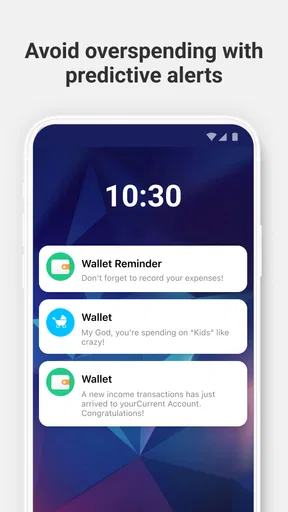
The practical benefit is less about restricting every small purchase and more about noticing trade-offs. A meal out might be perfectly reasonable on its own; repeated meals out can crowd out money you meant to save. Category limits help turn that vague feeling into something you can review and adjust. Alerts when you approach a limit can serve as a timely nudge, although I’d treat them as prompts to check in, not as a substitute for deciding what matters to you.
How I would make the budget useful
I’d start with a few categories that reflect real choices in my routine, rather than trying to classify every possible expense on day one. If the categories are too detailed, recording purchases becomes a chore. If they are too broad, the reports may not tell me what I need to know. A sensible middle ground is to begin with the recurring areas where I most want visibility, then refine the setup after I’ve seen how I actually spend.
There are two ways to keep the picture current: enter transactions manually or connect a bank account for automatic tracking. Manual entry asks for more attention, but it can make each purchase feel more deliberate and gives you a way to track spending without relying on account syncing. Automatic tracking is more convenient when it is available to you, though I would still review transactions and categories rather than assuming everything has been sorted exactly as I would do it.
One useful habit is to check a transaction soon after it happens, while its purpose is still clear. That makes it easier to correct a category or spot an unusual entry before it distorts a report. I’d also review the budget at a calm moment, not only when an alert arrives. The goal is to understand the pattern early enough to make a small adjustment, rather than reacting at the end of the month.
A realistic month with shared costs
Imagine I’m trying to keep food spending predictable while splitting household costs with a partner. I could use a grocery category to see how regular shops add up, then compare it with meals out instead of lumping both together. If the total is rising, that distinction helps me decide whether to plan more meals at home, change the grocery routine, or accept the higher spend because it is worthwhile that month.
Worth Reading Before You Choose

EA SPORTS FC Mobile 26 Is a Bigger Football Game, but It Takes Time

Flipboard Shows What News Apps Must Do Beyond the Feed

Switching to Android Auto Means Rethinking Your Driving Routine

Google Calendar Makes a Crowded Week Easier to Manage

Ludo King Makes the Most of the Minutes Between Plans

Baby Panda World Brings Quick Play to Modern Phones, but Its Game Library Feels Busy
For shared expenses, the option to share financial plans can help both people work from the same picture. I would still agree in advance on what counts as a shared cost and who records it; an app can make a plan visible, but it cannot settle different assumptions about fairness. That small conversation is what makes shared tracking useful rather than another source of confusion.
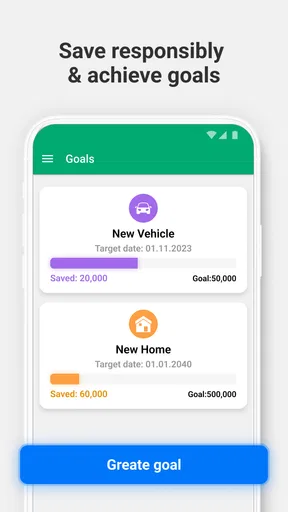
Goals add another reason to check in. If I’m setting money aside for a trip or a larger purchase, progress tracking can connect everyday choices with a longer-term aim. A practical tip is to make the goal concrete enough to recognize and then check whether the budget categories leave room for it. Otherwise, a goal can sit in the app looking encouraging without changing what happens to the money day to day.
Where it sits among finance tools
Compared with a spreadsheet, Wallet is more approachable for routine tracking: categories, budgets, alerts, reports, and goals are arranged as parts of a finance app rather than something I have to build myself. A spreadsheet may still be better if I want custom formulas, unusual accounting rules, or complete control over how every figure is arranged. Wallet’s appeal is that it can make regular check-ins less laborious, not that it replaces every kind of financial planning.
A basic banking app is another common alternative. It can show account activity, but a dedicated budgeting tool is more useful when I want to organize spending into categories, set limits, and review patterns across my finances. The right choice depends on the job: if I only need to check a balance, my bank’s app may be enough; if I want to understand habits and work toward a budget, Wallet offers a more focused workspace.
It is also worth distinguishing a spending tracker from a full financial adviser. Reports can help me notice where money goes, but they do not decide whether a purchase is sensible for my circumstances. I would use the app to inform my own choices, not treat a graph or alert as professional guidance or a guarantee that a budget will work.
Getting Started with Wallet
First things first, setting up the Wallet: Budget Expense Tracker app is a breeze. I downloaded it from the App Store, and within minutes, I was diving into its features. The user interface is pretty sleek, and it definitely doesn’t feel cluttered. For a finance app, that’s a huge plus in my book. You don't want to feel overwhelmed by numbers and charts the second you open it, am I right?
Key Features that Stand Out
Here's the lowdown on what makes this app tick:
- Expense Tracking: You can manually enter your expenses or link your bank account to track spending automatically. I tried both methods, and let me tell you, linking my account made me feel like a financial wizard.
- Budgeting: You can create budgets for different categories, like groceries, dining out, or that coffee addiction we all seem to have. The app sends you alerts when you’re close to reaching your limit, which is a nice little reality check.
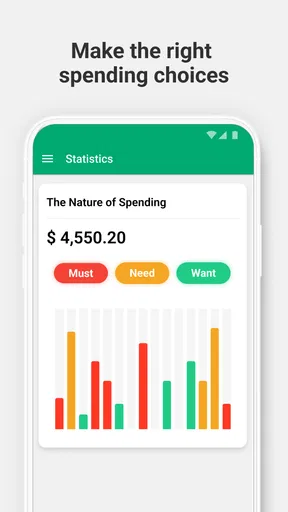
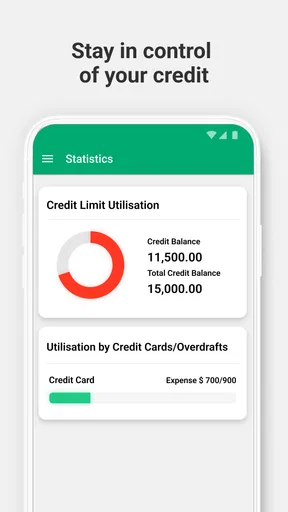
- Reports: This feature lets you see where your money is going, with detailed reports and charts. I was genuinely shocked to see how much I was spending on takeout.
- Goals: Set financial goals and track your progress. Saving for a vacation or a new gadget? The app helps you stay on course.
Why I Love It
Aside from the user-friendly interface, what I really dig about this app is the ability to sync across multiple devices. So, whether I’m on my phone or my tablet, I can always check in on my finances. The app's secure, too, so I don't have to worry about my personal financial details getting compromised.
Another nifty feature is the option to share your financial plans with family or partners. It’s a great way to make sure everyone’s on the same page, especially if you're sharing expenses.
A Few Things to Consider
Now, no app is perfect, right? While Wallet: Budget Expense Tracker does a lot of things right, there are a couple of things to keep in mind. Some features, like linking bank accounts or advanced reporting, require a premium subscription. It might be worth it if you're serious about managing your finances, but it’s something to consider.
Also, while the app supports multiple currencies, if you’re someone who frequently travels or deals with foreign currencies, you might find it a bit limiting. But for everyday budgeting, it’s a solid choice.
Who is likely to get the most from it?
Wallet is a finance app from BudgetBakers, and its broad appeal is reflected in a 4.6 average from around 372,000 ratings, with more than 10 million installs. It is free to download, rated for Everyone, and offers in-app purchases ranging from $0.99 to $144.99 per item. The current version is 9.2.8, and it has been available since April 21, 2011; it requires OS 8.1 or later.
I’d recommend trying it if you want to build a repeatable routine: record or review spending, check category limits, and use the results to make a decision. It suits people who are comfortable spending a little time organizing their money and who find visual reports more helpful than a running bank balance. The free starting point also lets a curious user see whether this style of budgeting fits before deciding whether paid features are worth considering.
It may be a poor fit if you want a completely hands-off system and have no interest in checking how transactions are categorized. It is also not the strongest match for someone who needs highly customized spreadsheet logic or who dislikes having financial activity organized into predefined categories. In those cases, a spreadsheet or a simpler account-viewing tool may feel more natural. If you handle several currencies often, the app’s currency support may not remove all the friction of that routine, so I’d test the workflow before relying on it as the center of travel budgeting.
Small decisions that improve the routine
One trade-off worth considering is convenience versus attention. Automatic transaction tracking can reduce data entry, but a quick review still matters: a purchase placed in the wrong category can make a budget look healthier or worse than it is. Manual tracking takes more effort, yet that extra moment can be useful for someone who wants to become more conscious of impulse spending. I would choose the method I can sustain, then use occasional checks to keep the picture credible.
Another practical choice is how ambitious to make the first budget. Setting limits that are unrealistically strict can make the app feel like a record of failure, while limits with no connection to actual spending are unlikely to guide decisions. I’d look at a normal stretch of expenses first, then set a target that leaves room for the essentials and a few priorities. The reports are most useful when they lead to a specific adjustment, not when I merely admire or dislike the chart.
For anyone wondering whether a subscription is necessary, the free download gives you a way to explore the app, while some capabilities, including bank linking or advanced reporting, may require premium access. I’d first decide which part of the routine I need most. If manual tracking and straightforward category budgets are enough, paying may not be essential for my use. If automatic syncing or deeper reporting would genuinely save time or help me make better decisions, then I’d weigh that benefit against the available in-app purchase options.
Wrapping It Up
In the end, if you’re looking to take control of your finances without having to deal with complex spreadsheets, Wallet: Budget Expense Tracker is a fantastic tool. It’s intuitive, packed with useful features, and even a bit fun to use. Who knew budgeting could be enjoyable?
If you’re ready to stop wondering where your money goes and start telling it where to go, give this app a shot. You might just find yourself a little more in control and a lot less stressed.
Pros
- Intuitive user interface for easy navigation.
- Real-time syncing across multiple devices.
- Customizable budget categories.
- Detailed spending analytics and reports.
- Supports multiple currencies.
Cons
- Limited features in the free version.
- No automatic bill payment option.
- Occasional syncing delays.
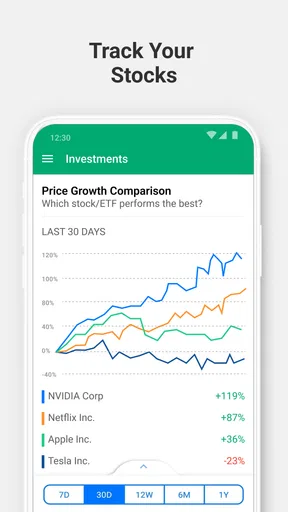
- Lacks investment tracking tools.
- Ads present in the non-premium version.
FAQs for Wallet: Budget Expense Tracker
What features does Wallet: Budget Expense Tracker offer?
Wallet: Budget Expense Tracker provides a comprehensive suite of features to help you manage your finances. You can track expenses, set budgets, and monitor financial goals. The app also offers bank synchronization to automatically update your transactions, making it easier to keep track of your spending habits in real-time.
Is Wallet: Budget Expense Tracker safe to use with my bank accounts?
Yes, Wallet: Budget Expense Tracker prioritizes user security by using bank-level encryption to protect your financial data. The app connects to your bank accounts securely, ensuring that your sensitive information remains confidential. Always ensure you download the app from a trusted source to maintain security.
Can I use Wallet: Budget Expense Tracker offline?
While Wallet: Budget Expense Tracker offers some offline functionality, such as entering transactions manually, full features like bank synchronization and cloud backup require an internet connection. However, you can still manage and review your budgets and expenses without being online.
Does Wallet: Budget Expense Tracker support multiple currencies?
Yes, Wallet: Budget Expense Tracker supports multiple currencies, making it ideal for users who deal with different currencies regularly. You can set your preferred currency and track expenses in various currencies, which is particularly useful for travelers or business professionals working internationally.
Are there any costs associated with using Wallet: Budget Expense Tracker?
Wallet: Budget Expense Tracker offers both free and premium versions. The free version provides essential features, while the premium version unlocks advanced functionalities like multiple account management, bank synchronization, and detailed financial reports. Users can choose based on their financial management needs.


